Crafting Precision: The Complete Guide to Laser Cut Decorative Boxes with Lids
In the evolving world of digital fabrication, few projects capture the perfect blend of utility and artistry quite like the decorative box with a lid. Whether you are a hobbyist exploring the capabilities of your new machine or a small business owner looking to create premium packaging, understanding the nuances of laser cut files and material selection is essential. These wooden gift boxes are more than just containers; they are tangible examples of how technology meets traditional craftsmanship.
This guide will walk you through everything you need to know about creating these stunning items, from selecting the right file formats to understanding material thicknesses and dimensions. We will demystify the technical aspects of laser cutting so you can focus on the creativity of the final product.
Why Choose a Laser Cut Wooden Gift Box?
The appeal of a wooden gift box lies in its warmth and durability. Unlike plastic or cardboard, wood offers a premium feel that elevates the perceived value of whatever is placed inside. When produced using laser cutting technology, these boxes achieve a level of precision that is impossible to replicate by hand.
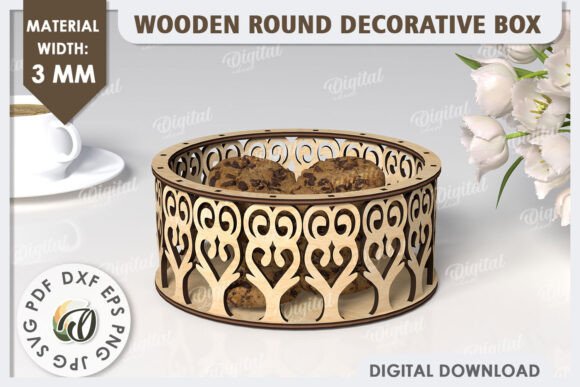
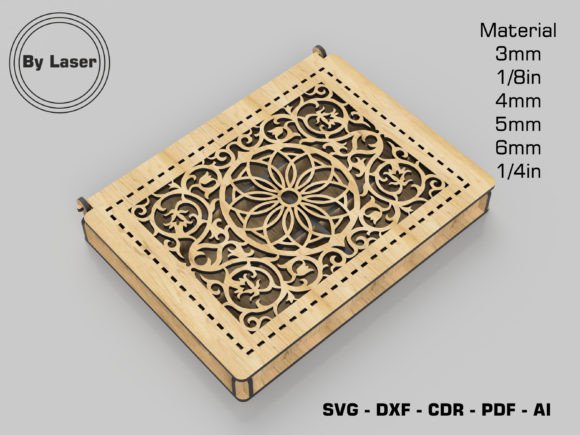
Laser cutting allows for intricate designs, such as the popular laser cut patterns found on lids and sides, which add an element of elegance without compromising structural integrity. These boxes are versatile. They serve as jewelry organizers, tea storage units, wedding favor containers, or high-end retail packaging. In modern commerce, where unboxing experiences are a significant part of customer satisfaction, a custom-made decorative box can be the difference between a forgettable transaction and a memorable brand interaction.
The Role of Digital Files in Modern Crafting
At the heart of every successful project is a high-quality digital blueprint. This is where Decorative Box SVG files and other vector formats come into play. An SVG (Scalable Vector Graphics) file uses mathematical paths to define shapes, ensuring that your design remains crisp and clear regardless of how much you scale it up or down.
However, not all software speaks the same language. While many hobbyists use software that prefers SVG or AI files, industrial and semi-industrial laser users often rely on LightBurn, a powerful control software. For these users, the workflow changes slightly. We request LightBurn users to import the files as DXF. The DXF (Drawing Exchange Format) is a universal CAD file format that ensures compatibility and precision when translating digital designs into physical cuts. Understanding which file format suits your workflow is the first step toward a successful cut.
Understanding Material Thickness and Selection
One of the most common points of confusion for beginners is material thickness. The strength, fit, and aesthetic of your decorative box depend heavily on choosing the correct material gauge. The files provided for this specific project are optimized for a variety of standard thicknesses to accommodate different machines and material availability.
When preparing your cut, you will encounter several standard measurements. It is crucial to match your physical material to the settings in your software to ensure the tabs and slots fit together perfectly. If the material is too thick, the box won't assemble; if it's too thin, the joints will be loose and fragile.
- 3 mm Material: Ideal for delicate items and lightweight gifts. This thickness allows for very fine detail in laser cut patterns.
- 1/8 in Material: Roughly equivalent to 3.175 mm, this is a standard imperial measurement often used in North America for plywood and acrylics.
- 4 mm Material: A robust choice that offers a great balance between sturdiness and ease of cutting.
- 5 mm Material: Provides a substantial feel, making it excellent for heavier contents or boxes intended for long-term storage.
- 6 mm Material: The thickest option listed, offering maximum durability. Note that cutting this thickness may require a higher-powered laser.
- 1/4 in Material: Approximately 6.35 mm, this is a heavy-duty option often used for furniture-grade projects or luxury packaging.
Selecting the right material isn't just about thickness; it's also about the type of wood. Birch plywood is a favorite among laser enthusiasts because it cuts cleanly and has a light, attractive grain. MDF (Medium Density Fiberboard) is another option that paints well but produces more smoke during cutting. Always ensure your material is safe for laser cutting and does not contain harmful adhesives like those found in some treated woods or vinyl-coated materials.
Dimensions and Structural Design
The specific design discussed here features External Dimensions of 200x150x25 mm. This creates a low-profile, rectangular footprint that is perfect for desktop organization or storing flat items like stationery, cosmetics, or tech accessories. The height of 25 mm keeps the profile sleek while providing enough depth to secure the contents.
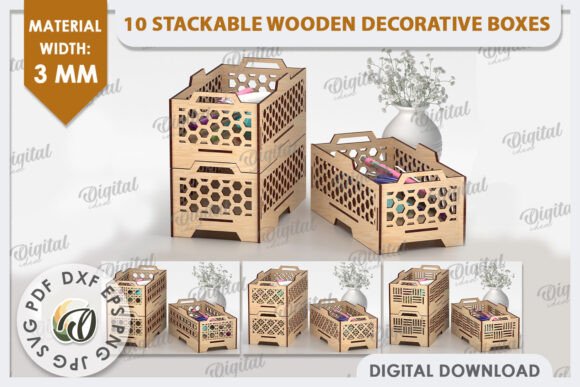
A standout feature of this design is the inclusion of 5 compartments. Internal dividers transform a simple box into a functional organizer. This compartmentalization adds complexity to the design but significantly increases its utility. For a jewelry maker, these slots could hold rings and earrings separately. For a tea enthusiast, they could separate different blends. The precision of the laser cut ensures that these dividers slot firmly into the base, creating a rigid structure that doesn't rattle.
Navigating File Formats for Every User
To ensure that this project is accessible to everyone, regardless of their preferred design software or operating system, the project files are available in a comprehensive range of formats. Having the right file extension can save hours of troubleshooting and redrawing.
- CDR File: Native to CorelDRAW, widely used in sign-making and professional engraving shops.
- SVG File: The gold standard for web-based design tools like Inkscape and browser-based editors. Perfect for the Decorative Box SVG workflow.
- DXF File: As mentioned, this is critical for LightBurn users and CAD professionals. It preserves geometric accuracy.
- PDF File: Universally viewable and often editable in vector programs. Great for quick previews and printing templates.
- EPS File: A legacy format still heavily used in the printing and illustration industry, compatible with Adobe Illustrator and older software versions.
- AI File: The native format for Adobe Illustrator, allowing for easy editing of layers and paths for advanced users.
By offering this variety, the barrier to entry is lowered. You don't need to be an expert in file conversion to start creating. Simply download the format that matches your software, load it into your laser cutter, and begin.
Common Misunderstandings and Tips for Success
A frequent assumption among beginners is that a "universal" setting exists for laser cutting. In reality, every machine is unique. A 40-watt laser will cut differently than a 100-watt laser, even with the same Material Thickness. Always run test cuts on scrap pieces of your chosen material before committing to the final design. This helps you dial in the power and speed settings to achieve a clean cut without excessive charring.
Another misconception is regarding the assembly. Laser cut boxes often use "finger joints" or tab-and-slot connections. These rely on friction. If your box feels too tight, do not force it, as this can split the wood. Conversely, if it is too loose, you may need to adjust the kerf offset in your software. Kerf is the width of the material removed by the laser beam. Accounting for kerf is what separates a professional finish from a amateur one.
The Broader Impact of DIY Fabrication
Creating a decorative box with a lid is more than a weekend project; it is an entry point into the broader maker movement. It teaches spatial reasoning, material science, and digital literacy. For educators, these projects provide a hands-on way to teach geometry and engineering principles. For businesses, they offer a cost-effective method to produce bespoke branding materials that stand out in a crowded market.
In our daily lives, surrounded by mass-produced goods, there is a growing appreciation for items that show evidence of human care and technological precision. A laser cut wooden box embodies this spirit. It combines the organic beauty of wood with the exactitude of computer-controlled machinery.
Whether you are utilizing a 3 mm Material for a delicate keepsake or a 6 mm Material for a sturdy tool organizer, the process remains a rewarding journey from digital concept to physical reality. By mastering the use of Laser Cut Files and understanding the nuances of formats like DXF and SVG, you unlock the ability to bring almost any idea to life. So, select your material, load your file, and let the laser do the rest.